.png)
There are times when a COBie deliverable is required and with the growing trend toward using COBie via the buildingSMART Alliance we have created a short guide to how to use our excel export settings to meet these needs. There are several levels to COBie compliance and in the example below we are using the Example provided by NIBS.
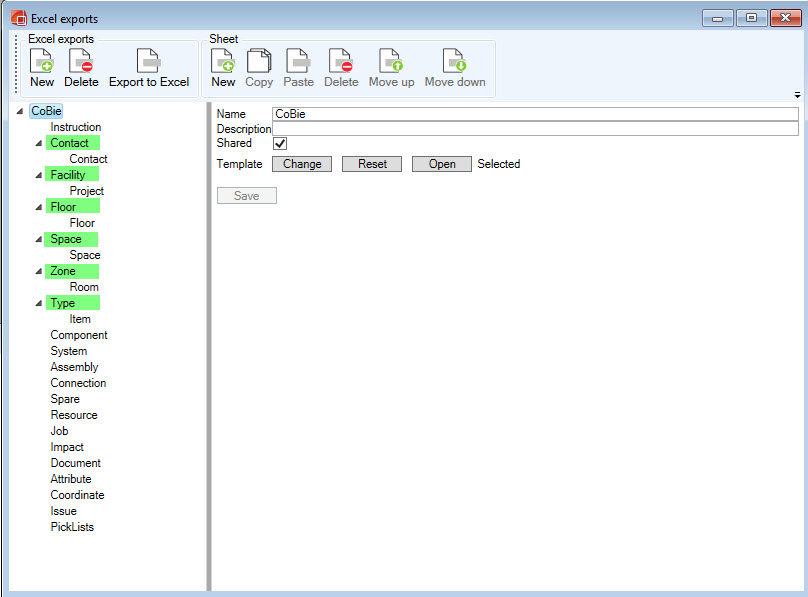
1. Excel Export:
-
Administration→ Configure Excel Export
-
New Export
-
Name COBie
-
Shared for multi user access
-
Select template
-
Save
2. Name Sheets by Selecting the New within the"Sheet" tab. Ensure that the naming convention of each sheet is consistent with CoBie Standards. By default, the starting row is 1. Switch the starting row for each sheet to 2. Save Each Sheet.
-
Instruction
-
Contact
-
Facility
-
Floor
-
Space
-
Zone
-
Type
-
Component
-
System
-
Assembly
-
Spare
-
Resource
-
Job
-
Impact
-
Document
-
Attribute
-
Coordinate
-
Connection
-
Issues
-
PickLists
3. Assign Data Sources to the following Sheets.

-
Contact
-
Target Type: User
-
Name: Contact
-
Attributes:
-
Add: General: Email
-
Add fixed value: dRofus_admin
-
Add fixed value: n/a
-
Add fixed value: Planner
-
Add fixed value: n/a
-
Add fixed value: n/a
-
Add fixed value: dRofus
-
-
Save
-
-
Facility
-
Target Type: Project
-
Name: Project
-
Attributes:
-
Add: General: Name
-
-
Save
-
-
Floor
-
Target Type: Group
-
Name: Floor
-
Attributes:
-
Add: General: Name
-
Add: Created by: Created by: Email
-
Add: Group Type: Group Type: Created
-
Add: General: Reference
-
Add fixed value: dRofus
-
Add fixed value: ifcBuildingStorey
-
Add fixed value: n/a
-
Add: General: Description
-
Add fixed value: n/a
-
Add fixed value: n/a
-
-
Save
-
-
Space
-
Target Type: Room
-
Name: Space
-
Attributes:
-
Add: Room: Room Function #
-
Add: Created by: Created by: Email
-
Add fixed value: n/a
-
Add: Level: Level: Name **
-
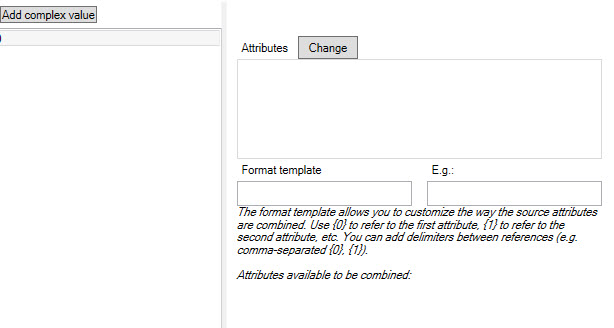
Add Complex value: Room Name, Room Name Description
-
Format Template: {0} {1}
-
E.g: Room Name Room Name Description
-
-
Add fixed value: dRofus
-
Add fixed value: IfcSpace
-
Add fixed value: n/a
-
Add: Room: Name on Drawing
-
Add: Room: Prog. Area
-
Add: Room: Designed Area
-
Add: Room: Ceiling Height
-
-
Save
-
-
Zone
-
Target Type: Room
-
Name: Room
-
Attributes:
-
Add Complex Value: Room Function: Number, Room Function: Name
-
Format Template: {0} {1}
-
E.g: Room function: Number Room function: Name
-
-
Add fixed value: dRofus_admin
-
Add fixed value: n/a
-
Add fixed value: Occupancy Zone
-
Add: Room: Room Function #:
-
Add fixed value: dRofus
-
Add fixed value: n/a
-
Add fixed value: n/a
-
Add: Room: Room Name
-
-
Save
-
-
Type:
-
Target Type: Item
-
Name: Item
-
Attributes:
-
Add: General: Item Number
-
Add Fixed Value: ( leave blank)
-
Add: Log History: Created
-
Add: General: Name
-
Add: Categorization: Sub Set (Name)
-
Add: Specification - Description (Flag) - Asset Type (Group) - Fixed/Movable (Element) - (Radio buttons/ combo box)*
-
Add fixed value: n/a
-
Add fixed value: n/a
-
Add fixed value: n/a
-
Add fixed value: n/a
-
Add fixed value: n/a
-
Add fixed value: n/a
-
Add fixed value: n/a
-
Add fixed value: dRofus
-
Add fixed value: n/a
-
Add fixed value: n/a
-
Add: General: Budget Price
-
Add fixed value: n/a
-
Add fixed value: n/a
-
Add fixed value: n/a
-
Add: General: Item Number
-
Add: Specification-Building I (Flag): Max dimensions and weight (Group) - With/length (Element) - inch (Numeric Field) *
-
Add: Specification-Building I: Max dimensions and weight - Depth (Element) - inch (Numeric Field) *
-
Add: Specification-Building I : Max dimensions and weight - Height (Element) - inch (Numeric Field) *
-
-
Save
-
*Attribute Added to Item Specification GUI
** Added type to Groups
This page references https://www.nibs.org/?page=bsa_commonbimfiles