.png)
Delete Items Occurrences
By default will all Item occurrences that are offered be included. You can delete occurrences that should not be covered by the Agreement.
-
Remove from Room: If your want to remove the Occurrence in the tender from the room, you must specify the number as 0 and not delete it. Occurrences which have been specified as 0 will be removed from reports and displays of equipment in a room.
-
Delete from agreement: If you delete it from the agreement, the status for the occurrence will return to offered and remain the same.
-
Delete Supplementary from agreement: If the occurrence is supplementary to the agreement, it can be deleted without further operations required.
-
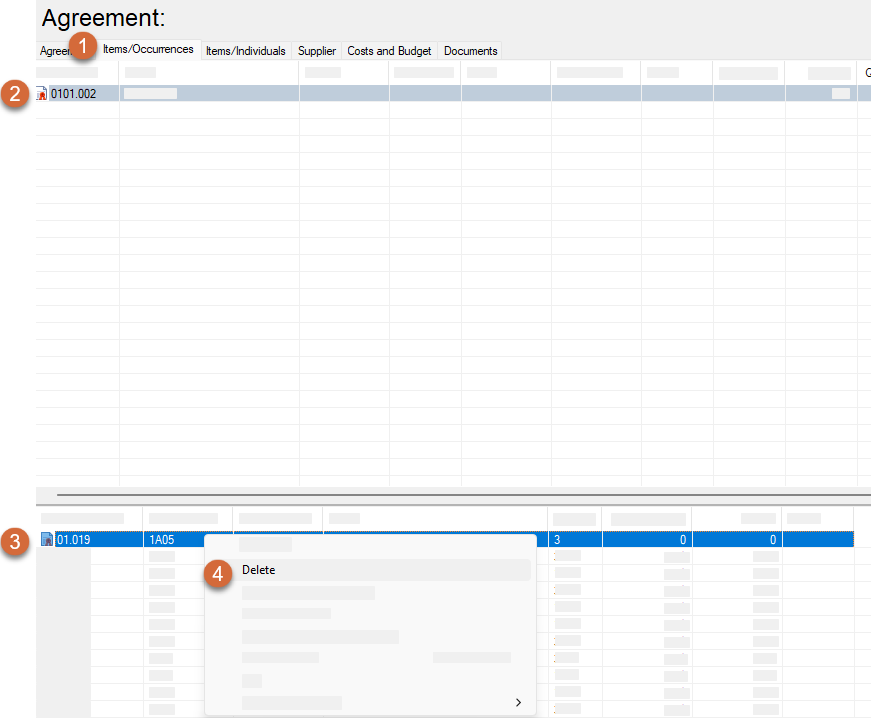
Select the “Items/Occurrences” Tab
-
Select Item
-
Right Click on the Occurrences of the Item that you would like not to be included in the tender
-
Select “Delete”
-
Select “Yes” If you are sure you would like to delete the occurences