.png)
Using the Calculated Attributes feature, you can build formulas dynamically using available dRofus fields to create additional fields. Calculated Attributes are available for Rooms, Items, Occurrences, and Products and allow you to build simple to very complex results. We explain how to do this for Room and Room Template Calculated Attributes, Items Calculated Attributes, and Occurrence Calculated Attributes. The Calculated Attribute Formats are the same across dRofus. A good baseline understanding of how Item Composite Text Attributes work is a great place to start since the rules can be combined with these attributes.
複合テキスト属性を作成するには、データベースへのスーパーユーザー権限が必要です。
以下を参照してください。 Project and Database Administration.
オカレンスのTrue/Falseと価値の例
例:
次の2つの条件を確認した上で、調達に移行してください:
もしその製品が
-
添付のドキュメント
-
単位価格
ここではオカレンスを扱っているので、部屋とアイテムが定義されていることがわかります。
この例では、複数のモジュールを同時にチェックしています。2つのフィールドが追加:
ドキュメントがある(yes/no)と、ユニットの価格。
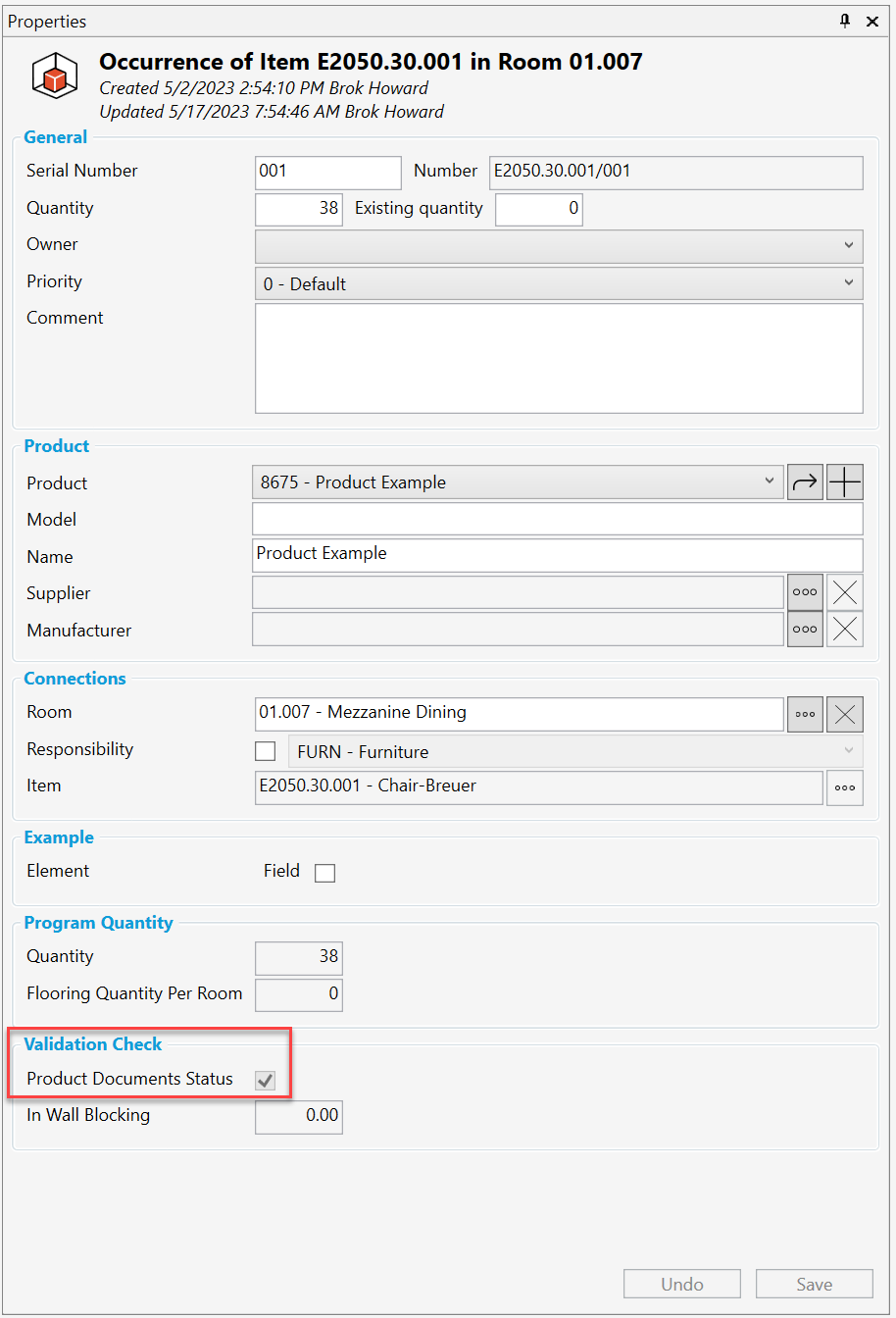
最初の部分は if/then (もし/ならば ) 形式で、製品にドキュメントがあり、かつ単価がゼロより大きいか、どうかをチェックします。両方が真ならTRUEを返します。どちらかが成立しない場合は FALSE を、
返します。データ型は、Yes/Noであるため、オカレンス・プロパティ・パネルで、
”Validation Check (検証チェック)” という新しいグループ内の “Product Documents Status (製品ドキュメントのステータス)” の下にチェックボックスが表示されています。これは、どのオカレンスが調達の準備ができているかを素早く確認するためにオカレンスリストに追加される列や、レポートフィルタで、
使用される列にもなり得ます。
Most calculated attributes are designed around numbers, and our default formulas create a bracket around the field {0} when building out a formula. But sometimes, we like to use text, yes/no, or list values. For example, when checking whether two text fields match or both values are True. For these formulas to work, you need to add a single quote around the bracket ‘{0}’ so that we know it should be a string, not a number.
オカレンス付き計算属性の最も強力な特徴は、全ての部屋プロパティ、部屋データ・フィールド、
アイテム・プロパティ、アイテム・データ・フィールド、製品プロパティ、製品データ・フィールド、
オカレンス・プロパティ、オカレンス・データ・フィールド、ドキュメント、イメージ・フィールドに
アクセスできることです。この強力な機能を活用することで、どのような発見があるか、
今から楽しみです。
|
Format |
Summary |
Example |
|---|---|---|
|
+ |
Returns the sum of two numeric operands. (Addition) |
{0} + {1} ~ 0:1, 1:4 = 5 |
|
- |
Returns the difference of two numeric operands. (Subtraction) |
{0} - 4 ~ 0:10 = 6 |
|
* |
Returns the product of two numeric operands. (Multiplication) |
{0} * {1} ~ 0:2, 1:3 = 6 |
|
/ |
Returns the quotient of two numeric operands. (Division) |
if ( {1} = 0, 0, {0} / {1} ) ~ 0:9, 1:3 = 3
|
|
and |
Indicates whether both operands are true. |
{0} < 10 and {0} > 0 ~ 0:5 = True |
|
or |
Indicates whether either or both operands are true. |
{0} < 2 or {0} >5 ~ 0:8 = True |
|
not |
Returns true if the logical operand is false. |
not ({0} < 0) ~ 0:-5 = False |
|
= |
Indicates whether the left operand is equal to the right operand. |
{0} = 4 ~ 0:4 = True |
|
!= |
Indicates whether the left operand is not equal to the right operand. |
{0} != {1} ~ 0:2, 1:4 = True |
|
< |
Indicates whether the left operand is less than the right operand. |
{0} < 0 ~ 0:2 = False |
|
<= |
Indicates whether the left operand is less than or equal to the right operand. |
{0} <=2 ~ 0:2 = True |
|
> |
Indicates whether the left operand is greater than the right operand. |
{0} > 0 ~ 0:8 = True |
|
>= |
Indicates whether the left operand is greater than or equal to the right operand. |
{0} >= 5 ~ 0:10 = True |
|
if |
Returns a value based on a condition |
if ( {0} % {1} = 0, ‘Yes’, ‘No’ ) ~ 0:4, 1:2 = Yes |
|
in |
Returns whether an element is in a list of values. |
in ( {0}, {1}, {2}, {3} ) ~ 0:7, 1:4, 2:7, 3:9 = True In the example above, the first declared argument '{0}' is the value you want to evaluate, in this example, the number '7' as defined by the '0:7' after the (~).
|
|
isNull |
Returns true if the operand is null. |
isNull ( {0} ) ~ 0: = True |
|
substring |
Returns a slice of the provided text. The slice is decided by a start position and optional end position, starting from 0. |
substring ( {0, 7) ~ 0:Doctor Rofus = Rofus
|
|
contains |
Returns true if the first text operand contains the second text operand. |
contains ( {0}, {1} ) ~ 0:abc, 1:a = True |
|
length |
Returns the number of characters in the text. |
length ( {0} ) ~ 0:Hello = 5 |
|
replace |
Replaces a substring in the first text operand. All matches of the second text operand are replaced with the third text operand. |
replace ( {0}, {1}, {2} ) ~ 0:Hello, 1:l, 2:xx = Hexxo |
|
startsWith |
Returns true if the first text operand starts with the second text operand. |
startsWith ( {0}, {1} ) ~ 0:Hello, 1:H = True |
|
endsWith |
Returns true if the first text operand ends with the second text operand. |
endsWith ( {0}, {1} ) ~ 0:Hello, 1:o = True |
|
regexIsMatch |
Returns true if the first text operand contains a match using the second text operand as a regular expression. |
regexIsMatch ( {0}, ‘a.*’ ) ~ 0:abc = True |
|
regexReplace |
Replaces a substring in the first text operand. All matches found using the second text operand as regular expression are replaced with the third text operand. |
regexReplace ( {0}, ‘l+’, 'X' ) ~ 0:Hello = HeXo |
|
regexGroup |
Returns the value of a regular expression group. Group index starts from 1 and defaults to 1 if not given. |
regexGroup ( {0}, ‘(1+)’ ) ~ 0:Hello = ll
|
|
Round |
Rounds a value to the nearest integer or specified number of decimal places. |
Round ( {0}, 2) ~ 0:3.1415 = 3.14 |
|
Floor |
Returns the largest integer less than or equal to the specified number. |
Floor ( {0} ) ~ 0:1.5 = 1 |
|
Ceiling |
Returns the smallest integer greater than or equal to the specified number. |
Ceiling ( {0} ) ~ 0:1.5 = 2 |
|
Truncate |
Calculates the integral part of a number. |
Truncate ( {0} ) ~ 0:3.14 = 3 |
|
Abs |
Returns the absolute value of a specified number. |
Abs ( {0} ) ~ 0:-1 = 1 |
|
Min |
Returns the smaller of two numbers. |
Min ( {0}, {1} ) ~ 0:-4, 1:23 = -4 |
|
Max |
Returns the larger of two numbers. |
Max ( {0}, {1} ) ~ 0:5, 1:8 = 8 |
|
Sqrt |
Returns the square root of a specified number. |
Sqrt ( {0} ) ~ 0:4 = 2 |
|
Pow |
Returns a specified number raised to the specified power. |
Pow ( {0}, 2) ~ 0:3 = 9 |
|
Exp |
Returns e raised to the specified power |
Exp ( {0} ) ~ 0:0 = 1 |
|
Log |
Returns the logarithm of a specified number. |
Log ( {0}, 10) ~ 0:1 = 0 |
|
Log10 |
Returns the base 10 logarithm of a specified number. |
Log10 ( {0} ) ~ 0:1 = 0 |
|
Sign |
Returns a value indicating the sign of a number. |
Sign ( {0} ) ~ 0:-10 = -1 |
|
Sin |
Returns the sine of the specified angle. |
Sin ( {0} ) ~ 0:0 = 0 |
|
Cos |
Returns the cosine of the specified angle. |
Cos ( {0} ) ~ 0:0 = 1 |
|
Tan |
Returns the tangent fo the specified angle. |
Tan ( {0} ) ~ 0:0 = 0 |
|
Asin |
Returns the angle whose sine is the specified number. |
Asin ( {0} ) ~ 0:0 = 0 |
|
Acos |
Returns the angle whose cosine is the specified number. |
Acos ( {0} ) ~ 0:1 = 0 |
|
Atan |
Returns the angle whose tangent is the specified number. |
Atan ( {0} ) ~ 0:0 = 0 |