
Use project items when an item or item child is needed in one project but should not be available to other projects.
This is only available for databases that includes more than one project. For multiproject databases, you can work with project specific items per projects in addition to Items that are available for all projects.
Project Items and Items
|
Item type |
Availability |
|---|---|
|
Project item |
Visible and usable only in the project it belongs to. |
|
Item |
Available across projects in the same database |
For example, an item required only for a particular building project can remain project-specific. If that item later becomes suitable for reuse, it can be made available for all projects.
A project item can also have child items. A child created under a project Item parent belongs to the same project.
Before you start
You need:
-
A multi-project database
-
Read access to items
-
Permission to create and edit project items in the current project.
To make a project item available for all projects, you also need permission to create items across projects.
Ask your administrator to check your access if you cannot perform an action.
Create a project item
These steps apply when you have read access to items and permission to create project items.
-
Open the project where the project item will be used.
-
Open the Items Module.
-
Select the lowest-level item group where you want to create the item.
-
Select New Item from the ribbon.
-
Enter the item information.
-
Select OK.
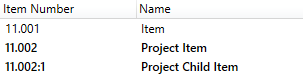
Result: In a database with more than one projects, project items is created for the current project by default. It is not visible or available for use in other projects in the same database. The project item will be shown in bold formatting:
Create a child of a project-specific item
Use a child item when you need a variant of an existing project item.
-
Open the Items Module in the project containing the parent item.
-
Select the project parent item.
-
Use the child-item creation procedure described in Create New and edit child items.
-
Enter the child item’s information and complete creation.
Result: the child appears under its parent and belongs to the same project.
For information about inherited item data and overriding values on children, see Parent Child Items.
Make an item available to other projects
If you want to reuse the project item in all other projects within the same database, the project item needs to be made available for all projects. You can then use “Share Item” to accomplish this.
Before proceeding:
-
Make sure you have permission to edit items.
Make project item available for all projects:
-
Select a project item
-
From the ribbon menu, select “Share Item”
-
Read the confirmation message carefully before completing the action.
-
Select OK.
Result: the item changes from project to an item that is available to other projects in the same database.
Notes and limitations
-
Project items cannot be used in templates. Use items for template content.
-
This workflow is for multi-project databases. In a database containing only one project, project items creation is not available.